
01
Build on accounting data
Use financial data as the basis for a climate inventory, then add activity data and other details where needed.
Use the accounting data you already have as a practical starting point for a climate inventory and sustainability reporting. Connect your ERP or accounting system today and create your first climate report in minutes.
30-day free trial. Then NOK 1,652/month excl. VAT, with no commitment.
Formerly Ducky Klimarapportering.
“The setup of the climate reporting tool is brilliant. It's so easy to understand—just the way it should be.”
From accounts to a finished climate inventory, step by step.
Watch the video on YouTube (opens in a new tab)You shouldn’t have to start from scratch every time a customer, bank or partner asks about your emissions and sustainability work. Build on information you already hold, then fill the gaps that matter.
Use financial data as the basis for a climate inventory, then add activity data and other details where needed.
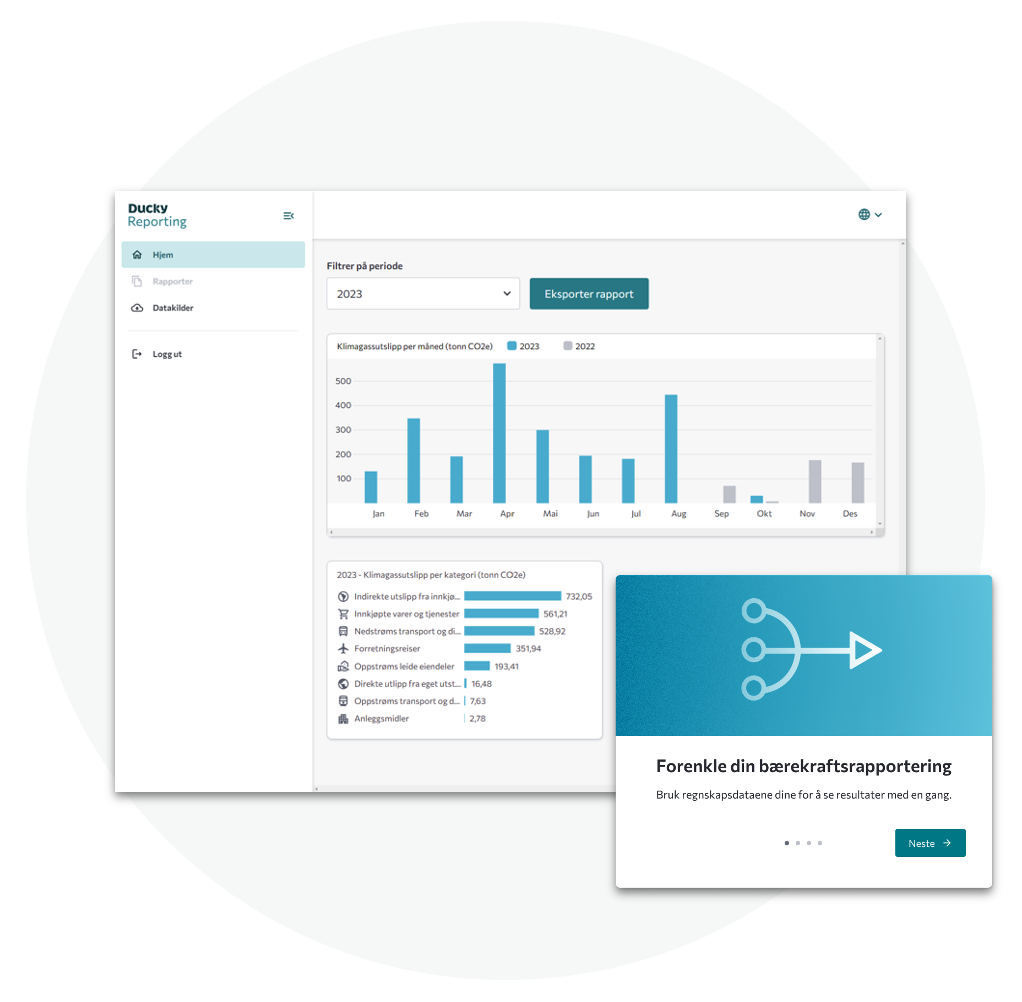
Prepare your climate inventory and sustainability report in one solution. Emissions data flows from the inventory into the reporting workflow.
Step-by-step guidance helps you work through the report. Your team checks the data and supplies the information that accounting records can’t provide.
“Good reporting begins with a useful picture of your business—not with another blank document.”
The thinking behind KlimarapporteringThree steps from accounts to a finished report.
Create an account and connect Visma Net, Business NXT, Tripletex, or upload a SAF-T file. Emissions are calculated straight away, per month and per account.
Improve accuracy by entering actual electricity and fuel where you have it. Connect Visma Expense for better business-travel figures. Use Kobla’s commuting survey (opens in a new tab) for better figures on scope 3.7 – employee commuting.
The climate inventory is ready once your accounting entries have been imported. You complete the sustainability report item by item. Next year, last year’s answers carry over. Download your finished reports as PDF, Word, Excel or PowerPoint files.
The climate inventory splits emissions into three groups, as the GHG Protocol does. For most businesses, most emissions sit in scope 3.
Direct emissions from your own vehicles, machinery and heating systems.
Read more Read more about Scope 1 (opens in a new tab)Electricity, district heating and cooling you purchase.
Read more Read more about Scope 2 (opens in a new tab)Everything else in the value chain: purchases, transport, travel and waste.
Read more Read more about Scope 3 (opens in a new tab)VS (formerly VSME) is the EU standard for businesses that are not required to report but get questions from customers and banks. Klimarapportering guides you through every item in the standard and follows the Norwegian guide to voluntary sustainability reporting. The report is included in the price.
We have written almost 30 help articles in Norwegian that explain climate reporting in plain words. Wondering what “upstream transport (opens in a new tab)” means, or how an account should be booked to give the right figures? You’ll find the answer there.
We also have agreements with many Visma partners, who are experts in ERP systems and accounting.
See all help articles (opens in a new tab) Visma Net
 Business NXT
 Tripletex
 Visma Expense (travel)
 Control Edge (Sweden)
Upload SAF-T files from, for example, Visma Business, Fiken or Xledger. All Norwegian accounting systems should be able to export SAF-T.
All prices excl. VAT. After 30 days, the trial becomes a rolling subscription with no commitment.
for one company
for each additional company in the same group
NOK 1,652 per month for one company, and NOK 329 for each additional company in the same group, excl. VAT. The sustainability report is included. The first 30 days are free.
Yes, we’re happy to help. We have agreements with many Visma partners who are experts in ERP systems and accounting. They are glad to help customers understand the big picture and the easiest way to get started with sustainability reporting for your particular industry.
The trial becomes a rolling subscription. There is no commitment period.
No. Every step is explained, and the help articles (opens in a new tab) cover the terms you’ll come across. If you have specific questions, an adviser can help.
You only need to know a few:
Scope 1, 2 and 3: Where emissions come from. Scope 1 is your own vehicles and heating systems, scope 2 is electricity and heat you buy, and scope 3 is everything else, such as purchases, transport and travel.
VS (formerly VSME): The EU’s voluntary standard for sustainability reports. This is what Klimarapportering helps you create.
CSRD and ESRS: The rules the very largest companies must follow. When they ask you for figures, it’s because of these rules.
SAF-T: A file you can export from your accounting system. Klimarapportering can read it if you don’t use Visma or Tripletex.
More abbreviations are explained in the help article Common abbreviations in sustainability reporting (opens in a new tab) (in Norwegian).
Emissions are calculated automatically from your accounts. Actual consumption of electricity and fuel, and the rest of the sustainability report, you fill in yourselves. Read about activity data (opens in a new tab).
The climate inventory shows your emissions. The sustainability report also covers employees, waste and policies, and uses the emissions from the climate inventory.
Yes. If your system isn’t integrated, you can import a SAF-T file. Here’s how (opens in a new tab).
Yes, VS is made for exactly that. It’s a good idea to check what the recipient needs first.
See the explanation at the bottom of the page in the Visma App Store (opens in a new tab).
You can download finished reports as PDF, Word, Excel or PowerPoint files.
Yes. The product is now called Klimarapportering and is developed by Disrupting IT.
See the frequently asked questions (opens in a new tab) (in Norwegian) or write to info@disruptingit.com.
Create an account, connect your accounts and see your emissions. 30 days free, then no commitment.